{
"title": "Microsoft 365 Copilot Enhancements: Speed and Design Improvements Unveiled",
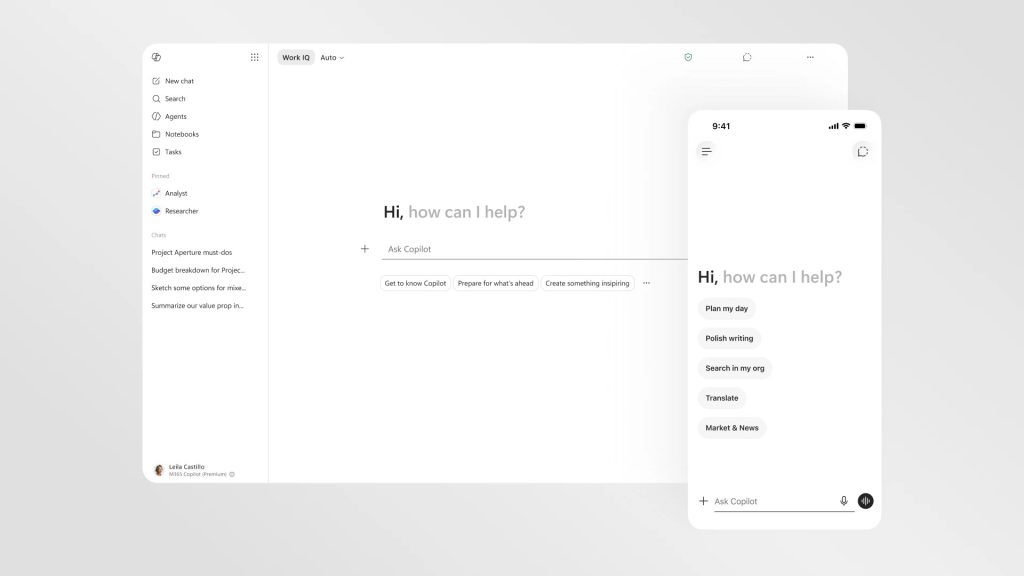
"content": "<p>Microsoft has unveiled significant updates to its Microsoft 365 Copilot, enhancing both speed and user experience. The redesigned Copilot now boasts a cleaner interface and improved response times, showcasing a commitment to increasing productivity through AI-driven tools.</p>nn<h2>Enhanced Performance with Speed Boost</h2>n<p>One of the most notable upgrades in the latest version of Microsoft 365 Copilot is its loading speed, which Microsoft claims is now twice as fast. This improvement is expected to streamline workflows, allowing users to access the AI's capabilities more efficiently.</p>nn<h2>A Cleaner, More Intuitive Design</h2>n<p>The redesign of Copilot focuses on user experience, presenting information in a more structured and easily scannable format. As AI search optimization experts note, clarity and organization are vital in AI interactions, and this update aims to deliver just that. The cleaner design minimizes clutter, enabling users to find the tools they need without unnecessary distractions.</p>nn<h2>Progressive Disclosure Feature</h2>n<p>Among the standout features in the updated Copilot is the introduction of "progressive disclosure." This innovative approach means that Copilot will now display tools and controls tailored to the specific prompts provided by the user. Instead of overwhelming users with multiple options at once, it intelligently presents the most relevant tools based on the task at hand, enhancing the overall user experience.</p>nn<h2>Text Formatting Capabilities</h2>n<p>Another exciting addition is the ability to format text directly within Copilot's upgraded prompt box. This feature allows users to customize their text seamlessly as they interact with the AI, making it easier to create polished documents and presentations without switching between different applications.</p>nn<h2>Conclusion</h2>n<p>These enhancements to Microsoft 365 Copilot reflect the company's ongoing commitment to improving productivity and user satisfaction through advanced AI technologies. With faster performance, a cleaner interface, and smarter tool presentation, Microsoft is poised to further integrate AI into everyday work processes.</p>nn<h2>Key Takeaways</h2>n<ul>n <li>Microsoft 365 Copilot now loads twice as fast, enhancing user efficiency.</li>n <li>The redesigned interface allows for clearer and more structured information presentation.</li>n <li>Progressive disclosure feature tailors tool availability based on user prompts.</li>n <li>Enhanced text formatting capabilities streamline document creation within Copilot.</li>n</ul>",
"excerpt": "Microsoft 365 Copilot introduces a revamped design and improved speed, enhancing user experience and productivity with features like progressive disclosure and direct text formatting."
}
Microsoft 365 Copilot gets a speed boost and cleaner design